# Rubrique Abonnés

### <a name="_Toc225499542"></a><span style="font-family: 'Century Gothic'; font-size: 13pt; color: #000000;">**Paramètres par défaut**</span>

<span style="font-family: 'Century Gothic'; font-size: 10pt; color: #000000;">![embedded-image-lrawd1rl.png](https://bookstack.decalog.net/uploads/images/gallery/2026-09/embedded-image-lrawd1rl.png)</span>

<span style="font-family: 'Century Gothic'; font-size: 10pt; color: #000000;">C'est ici que vous règlerez les limites de temps de connexion des postes pour chaque jour de la semaine. Vous autoriserez ou vous interdirez l'accès aux partages personnels et communs. </span>

<p class="callout info"><span style="font-family: 'Century Gothic'; font-size: 10pt; color: #000000;">Le partage personnel est en lecture/écriture. </span></p>

<p class="callout info"><span style="font-family: 'Century Gothic'; font-size: 10pt; color: #000000;">Le partage commun est en lecture seule.</span></p>

<span style="font-family: 'Century Gothic'; font-size: 10pt; color: #000000;">Vous donnerez ou pas le droit aux abonnés EPN d'imprimer (pour les abonnés du logiciel de gestion de la bibliothèque, ce droit est géré par la cotisation).</span>

<span style="font-family: 'Century Gothic'; font-size: 10pt; color: #000000;">Si vous optez pour l’option Réservation de postes, vous pouvez également définir si un abonné a, par défaut, le droit de réserver un poste.</span>

<p class="callout warning"><span style="font-family: 'Century Gothic'; font-size: 10pt; color: #000000;">**ATTENTION**</span><span style="font-family: 'Century Gothic'; font-size: 10pt; color: #000000;"> ! </span><span style="font-family: 'Century Gothic'; font-size: 10pt; color: #000000;">**Les paramètres par défaut ne sont**</span><span style="font-family: 'Century Gothic'; font-size: 10pt; color: #000000;"> </span><span style="font-family: 'Century Gothic'; font-size: 10pt; color: #000000;">**pas rétroactifs**</span><span style="font-family: 'Century Gothic'; font-size: 10pt; color: #000000;">. Ils ne s’appliqueront pas sur les abonnés qui ont déjà un compte sur l’EPN. Si vous faites une modification en cours de production dans cette page il faudra faire un ou plusieurs traitements par lots sur vos abonnés dans la liste des abonnés.</span></p>

### <a name="_Toc1476373"></a><a name="_Toc225499543"></a><span style="font-family: 'Century Gothic'; font-size: 13pt; color: #000000;">**Catégories d’abonnés**</span>

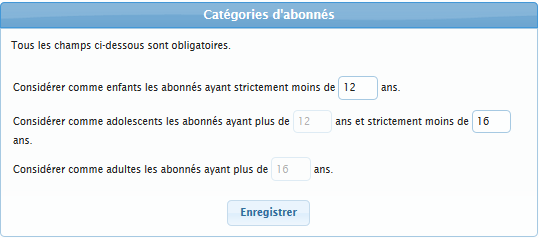
<span style="font-family: 'Century Gothic'; font-size: 10pt; color: #000000;">![embedded-image-q2teowh2.png](https://bookstack.decalog.net/uploads/images/gallery/2026-09/embedded-image-q2teowh2.png)</span>

<span style="font-family: 'Century Gothic'; font-size: 10pt; color: #000000;">Ces catégories vont</span><span style="font-family: 'Century Gothic'; font-size: 10pt; color: #000000;"> selon les paramètres</span><span style="font-family: 'Century Gothic'; font-size: 10pt; color: #000000;"> influer sur :</span>

- <span style="font-family: 'Century Gothic'; font-size: 10pt; color: #000000;">Le filtrage Internet ;</span>
- <span style="font-family: 'Century Gothic'; font-size: 10pt; color: #000000;">L’accès à tel ou tel poste</span><span style="font-family: 'Century Gothic'; font-size: 10pt; color: #000000;"> ;</span>
- <span style="font-family: 'Century Gothic'; font-size: 10pt; color: #000000;">L’impression </span><span style="font-family: 'Century Gothic'; font-size: 10pt; color: #000000;">noir et blanc ou </span><span style="font-family: 'Century Gothic'; font-size: 10pt; color: #000000;">couleur</span><span style="font-family: 'Century Gothic'; font-size: 10pt; color: #000000;"> ;</span>
- <span style="font-family: 'Century Gothic'; font-size: 10pt; color: #000000;">L’accès à la réservation</span><span style="font-family: 'Century Gothic'; font-size: 10pt; color: #000000;">.</span>

### <a name="_Toc1476374"></a><a name="_Toc225499544"></a><span style="font-family: 'Century Gothic'; font-size: 13pt; color: #000000;">**Répertoires personnels**</span>

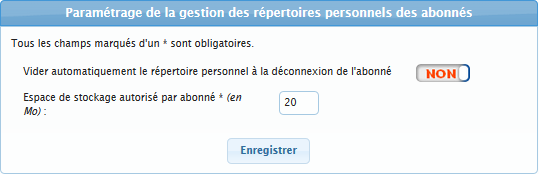
<span style="font-family: 'Century Gothic'; font-size: 10pt; color: #000000;">![embedded-image-id9fbbhz.png](https://bookstack.decalog.net/uploads/images/gallery/2026-09/embedded-image-id9fbbhz.png)</span>

<span style="font-family: 'Century Gothic'; font-size: 10pt; color: #000000;">Vous pouvez a</span><span style="font-family: 'Century Gothic'; font-size: 10pt; color: #000000;">juster la capacité de stockage offert à </span><span style="font-family: 'Century Gothic'; font-size: 10pt; color: #000000;">vos</span><span style="font-family: 'Century Gothic'; font-size: 10pt; color: #000000;"> abonné</span><span style="font-family: 'Century Gothic'; font-size: 10pt; color: #000000;">s</span><span style="font-family: 'Century Gothic'; font-size: 10pt; color: #000000;"> suivant l'usage de ceux-ci.</span><span style="font-family: 'Century Gothic'; font-size: 10pt; color: #000000;"> </span>

<p class="callout info"><span style="font-family: 'Century Gothic'; font-size: 10pt; color: #000000;">Il n’y a pas de passe-droits, </span><span style="font-family: 'Century Gothic'; font-size: 10pt; color: #000000;">**tous les abonnés sont à la même enseigne**</span><span style="font-family: 'Century Gothic'; font-size: 10pt; color: #000000;"> : si vous autorisez un quota de 20 Mo par abonné, chaque abonné aura 20 Mo. </span></p>

<p class="callout warning"><span style="font-family: 'Century Gothic'; font-size: 10pt; color: #000000;">**L’espace de stockage défini ici n’est pas une limitation. Decalog EPN applique un quota**</span><span style="font-family: 'Century Gothic'; font-size: 10pt; color: #000000;">. Au-delà de ce quota, l’abonné recevra un premier puis un second message l’incitant à vider son espace.</span></p>

### <a name="_Toc1476375"></a><a name="_Toc225499545"></a><span style="font-family: 'Century Gothic'; font-size: 13pt; color: #000000;">**Liste des abonnés**</span>

#### <span style="font-family: 'Century Gothic'; font-size: 12pt; color: #404040;">Utiliser la liste des abonnés</span>

<span style="font-family: 'Century Gothic'; font-size: 10pt; color: #000000;">A partir de cette liste d'abonnés, vous pourrez accéder à diverses fonctionnalités :</span>

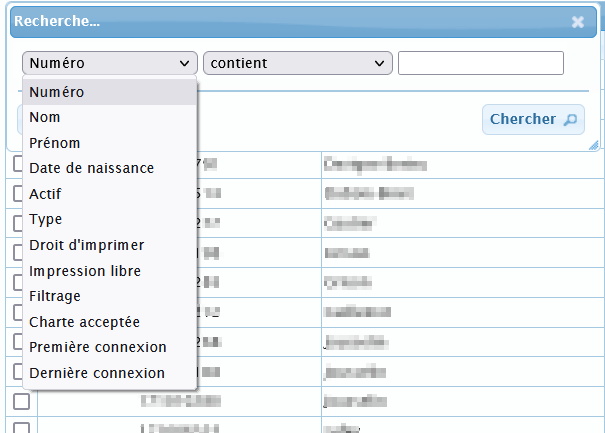
<span style="font-family: 'Century Gothic'; font-size: 10pt; color: #000000;">![embedded-image-c7twgvdv.png](https://bookstack.decalog.net/uploads/images/gallery/2026-09/embedded-image-c7twgvdv.png)</span><span style="font-family: 'Century Gothic'; font-size: 10pt; color: #000000;"> </span><span style="font-family: 'Century Gothic'; font-size: 10pt; color: #000000;">**Recherc**</span><span style="font-family: 'Century Gothic'; font-size: 10pt; color: #000000;">**her**</span>

<span style="font-family: 'Century Gothic'; font-size: 10pt; color: #000000;">![embedded-image-emquwnlg.png](https://bookstack.decalog.net/uploads/images/gallery/2026-09/embedded-image-emquwnlg.png)</span>

<span style="font-family: 'Century Gothic'; font-size: 10pt; color: #000000;">![embedded-image-gnj6uvz2.png](https://bookstack.decalog.net/uploads/images/gallery/2026-09/embedded-image-gnj6uvz2.png)</span><span style="font-family: 'Century Gothic'; font-size: 10pt; color: #000000;"> </span><span style="font-family: 'Century Gothic'; font-size: 10pt; color: #000000;">**Recharger le tableau**</span><span style="font-family: 'Century Gothic'; font-size: 10pt; color: #000000;"> (pour rafraîchir l'affichage de la liste après modification.)</span>

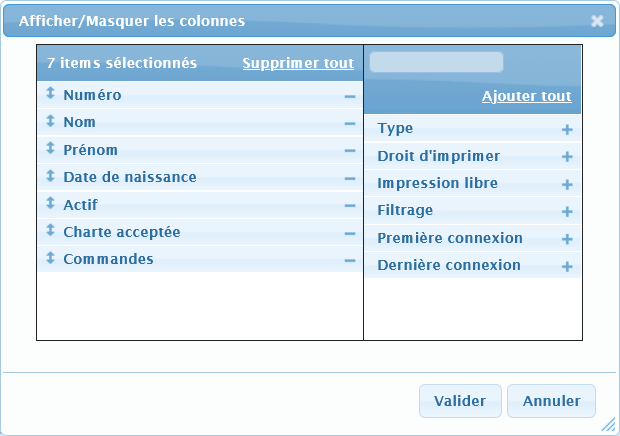
<span style="font-family: 'Century Gothic'; font-size: 10pt; color: #000000;">![embedded-image-nsapwuf6.png](https://bookstack.decalog.net/uploads/images/gallery/2026-09/embedded-image-nsapwuf6.png)</span><span style="font-family: 'Century Gothic'; font-size: 10pt; color: #000000;"> </span><span style="font-family: 'Century Gothic'; font-size: 10pt; color: #000000;">**Afficher / Masquer les colonnes**</span>

<span style="font-family: 'Century Gothic'; font-size: 10pt; color: #000000;">![embedded-image-1bt6tiaa.png](https://bookstack.decalog.net/uploads/images/gallery/2026-09/embedded-image-1bt6tiaa.png)</span>

<span style="font-family: 'Century Gothic'; font-size: 10pt; color: #000000;">Cliquer sur + ou - </span><span style="font-family: 'Century Gothic'; font-size: 10pt; color: #000000;">pour afficher ou cacher les colonnes.</span><span style="font-family: 'Century Gothic'; font-size: 10pt; color: #000000;"> Il est également possible de les glisser-déposer.</span>

<span style="font-family: 'Century Gothic'; font-size: 10pt; color: #000000;">N'oubliez pas de </span><span style="font-family: 'Century Gothic'; font-size: 10pt; color: #000000;">valider</span><span style="font-family: 'Century Gothic'; font-size: 10pt; color: #000000;"> après avoir effectué votre choix.</span>

<a name="OLE_LINK1"></a><span style="font-family: 'Century Gothic'; font-size: 10pt; color: #000000;">![embedded-image-b8tvgd9o.png](https://bookstack.decalog.net/uploads/images/gallery/2026-09/embedded-image-b8tvgd9o.png)</span><span style="font-family: 'Century Gothic'; font-size: 10pt; color: #000000;"> </span><span style="font-family: 'Century Gothic'; font-size: 10pt; color: #000000;">**Ajouter un abonné EPN**</span>

<p class="callout info"><span style="font-family: 'Century Gothic'; font-size: 10pt; color: #000000;">Il existe deux types d’abonnés :  
</span><span style="font-family: 'Century Gothic'; font-size: 10pt; color: #000000;">1/ Les abonnés du SIGB (déjà inscrit à la bibliothèque) seront créés automatiquement lors de la première connexion à l'</span><span style="font-family: 'Century Gothic'; font-size: 10pt; color: #000000;">EPN</span><span style="font-family: 'Century Gothic'; font-size: 10pt; color: #000000;"> (seuls les abonnés individuels sont reconnus par celui-ci) ou via le bouton </span><span style="font-family: 'Century Gothic'; font-size: 10pt; color: #000000;">![embedded-image-ryfqshuh.png](https://bookstack.decalog.net/uploads/images/gallery/2026-09/embedded-image-ryfqshuh.png)  
</span><span style="font-family: 'Century Gothic'; font-size: 10pt; color: #000000;">2/ Les abonnés </span><span style="font-family: 'Century Gothic'; font-size: 10pt; color: #000000;">EPN</span><span style="font-family: 'Century Gothic'; font-size: 10pt; color: #000000;"> qui peuvent être apparentés à des cartes jetables. Ils autorisent une connexion à l'</span><span style="font-family: 'Century Gothic'; font-size: 10pt; color: #000000;">EPN</span><span style="font-family: 'Century Gothic'; font-size: 10pt; color: #000000;"> sans être inscrit dans le SIGB de la médiathèque.</span></p>

<p class="callout info"><span style="font-family: 'Century Gothic'; font-size: 10pt; color: #000000;">Si la date de naissance n'est pas renseignée, l'abonné sera considéré comme étant dans la catégorie la plus "jeune". Il ne pourra donc pas accéder à tous les services offerts par la médiathèque.</span></p>

<p class="callout info"><span style="font-family: 'Century Gothic'; font-size: 10pt; color: #000000;">Autoriser les connexions simultanées permet à plusieurs personnes de se connecter sous le numéro unique d'une seule (cas des groupes et des classes). Dans ce cas, les limites de temps sont désactivées.</span></p>

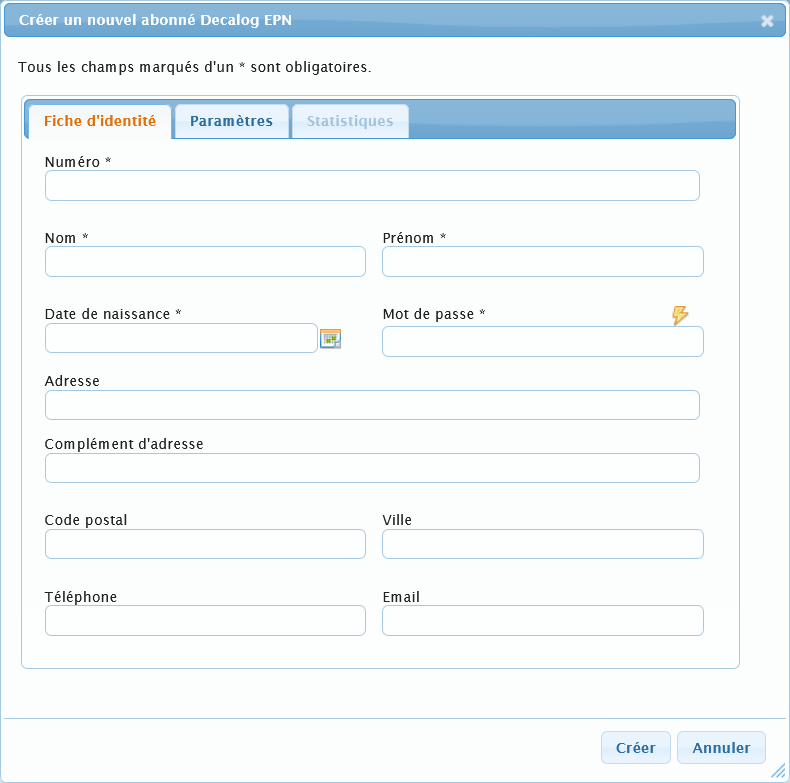
<span style="font-family: 'Century Gothic'; font-size: 10pt; color: #000000;">C'est donc en cliquant sur le bouton </span><span style="font-family: 'Century Gothic'; font-size: 10pt; color: #000000;">![embedded-image-yvfkpgzr.png](https://bookstack.decalog.net/uploads/images/gallery/2026-09/embedded-image-yvfkpgzr.png)</span><span style="font-family: 'Century Gothic'; font-size: 10pt; color: #000000;"> que vous pourrez ajouter un abonné EPN.</span>

<span style="font-family: 'Century Gothic'; font-size: 10pt; color: #000000;">Les champs à renseigner obligatoirement sont marqués par un astérisque (\*)</span>

<span style="font-family: 'Century Gothic'; font-size: 10pt; color: #000000;">Le bouton </span><span style="font-family: 'Century Gothic'; font-size: 10pt; color: #000000;">![embedded-image-jdkcufu2.png](https://bookstack.decalog.net/uploads/images/gallery/2026-09/embedded-image-jdkcufu2.png)</span><span style="font-family: 'Century Gothic'; font-size: 10pt; color: #000000;"> permet </span><span style="font-family: 'Century Gothic'; font-size: 10pt; color: #000000;">de générer un mot de passe aléatoire</span><span style="font-family: 'Century Gothic'; font-size: 10pt; color: #000000;">.</span><span style="font-family: 'Century Gothic'; font-size: 10pt; color: #000000;"> </span>

<span style="font-family: 'Century Gothic'; font-size: 10pt; color: #000000;">![embedded-image-ua3phosu.png](https://bookstack.decalog.net/uploads/images/gallery/2026-09/embedded-image-ua3phosu.png)</span>

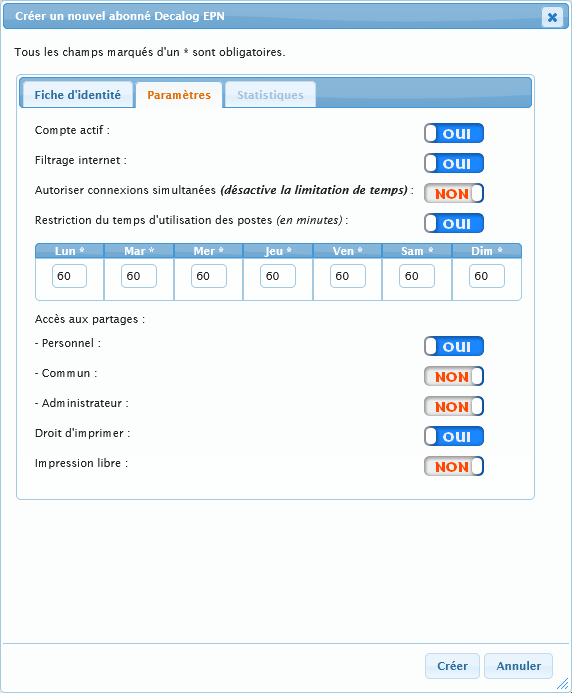
<span style="font-family: 'Century Gothic'; font-size: 10pt; color: #000000;">Après avoir rempli la fiche d'identité, (onglet Fiche d'identité), vous </span><span style="font-family: 'Century Gothic'; font-size: 10pt; color: #000000;">pouvez</span><span style="font-family: 'Century Gothic'; font-size: 10pt; color: #000000;"> régler les paramètres d'utilisation de l'EPN de l'abonné que vous êtes en train d'inscrire.</span><span style="font-family: 'Century Gothic'; font-size: 10pt; color: #000000;"> </span>

<p class="callout info"><span style="font-family: 'Century Gothic'; font-size: 10pt; color: #000000;">Le paramétrage d’un nouvel abonné n’est pas nécessaire</span><span style="font-family: 'Century Gothic'; font-size: 10pt; color: #000000;"> car le nouvel abonné récupère les paramètres par défaut. </span><span style="font-family: 'Century Gothic'; font-size: 10pt; color: #000000;">Au contraire, vous pourrez modifier les paramètres d’un utilisateur spécifique directement dans sa fiche.</span></p>

<span style="font-family: 'Century Gothic'; font-size: 10pt; color: #000000;">![embedded-image-4db5jcux.png](https://bookstack.decalog.net/uploads/images/gallery/2026-09/embedded-image-4db5jcux.png)</span>

1. <span style="font-family: 'Century Gothic'; font-size: 10pt; color: #000000;">Le </span><span style="font-family: 'Century Gothic'; font-size: 10pt; color: #000000;"><u>partage commun</u></span><span style="font-family: 'Century Gothic'; font-size: 10pt; color: #000000;"> n'est accessible qu'en lecture, seul le </span><span style="font-family: 'Century Gothic'; font-size: 10pt; color: #000000;"><u>partage personnel</u></span><span style="font-family: 'Century Gothic'; font-size: 10pt; color: #000000;"> permet la lecture et l'écriture.</span>
2. <span style="font-family: 'Century Gothic'; font-size: 10pt; color: #000000;">Autoriser les connexions simultanées désactive la limitation de temps paramétrée par défaut. Cette option n'est utile que pour les groupes ou dans le cas d'animations ou de formations.</span>
3. <span style="font-family: 'Century Gothic'; font-size: 10pt; color: #000000;">Si le compte n'est pas actif, l'abonné ne pourra en aucun cas se connecter à l'EPN et à internet.</span>
4. <span style="font-family: 'Century Gothic'; font-size: 10pt; color: #000000;">L’accès au partage administrateur permet de gérer le contenu du partage commun et d’accéder aux comptes personnels. Il n’est à donner qu’à des utilisateurs « </span><span style="font-family: 'Century Gothic'; font-size: 10pt; color: #000000;">administrateurs</span><span style="font-family: 'Century Gothic'; font-size: 10pt; color: #000000;"> »</span><span style="font-family: 'Century Gothic'; font-size: 10pt; color: #000000;"> ou « animateurs »</span>
5. <span style="font-family: 'Century Gothic'; font-size: 10pt; color: #000000;">L’impression libre est à cocher par exemple à des utilisateurs de type « </span><span style="font-family: 'Century Gothic'; font-size: 10pt; color: #000000;">administrateurs » ou « animateurs</span><span style="font-family: 'Century Gothic'; font-size: 10pt; color: #000000;"> ».</span>

<span style="font-family: 'Century Gothic'; font-size: 10pt; color: #000000;">A l'issue de cette inscription, n'oubliez pas de cliquer sur le bouton </span><span style="font-family: 'Century Gothic'; font-size: 10pt; color: #000000;">![embedded-image-jddwttpg.png](https://bookstack.decalog.net/uploads/images/gallery/2026-09/embedded-image-jddwttpg.png)</span><span style="font-family: 'Century Gothic'; font-size: 10pt; color: #000000;"> pour valider l'inscription dans l'EPN ou sur le bouton </span><span style="font-family: 'Century Gothic'; font-size: 10pt; color: #000000;">![embedded-image-8v7tsmp1.png](https://bookstack.decalog.net/uploads/images/gallery/2026-09/embedded-image-8v7tsmp1.png)</span><span style="font-family: 'Century Gothic'; font-size: 10pt; color: #000000;"> en cas d'erreur. Dans ce dernier cas, l'inscription ne sera pas prise en compte et l'abonné ne figurera pas dans la liste des abonnés.</span>

<span style="font-family: 'Century Gothic'; font-size: 10pt; color: #000000;">  
 </span><span style="font-family: 'Century Gothic'; font-size: 10pt; color: #000000;">![embedded-image-uhg8kx8m.png](https://bookstack.decalog.net/uploads/images/gallery/2026-09/embedded-image-uhg8kx8m.png)</span><span style="font-family: 'Century Gothic'; font-size: 10pt; color: #000000;"> </span><span style="font-family: 'Century Gothic'; font-size: 10pt; color: #000000;">**Modifier l'abonné ou les abonnés sélectionnés**</span>

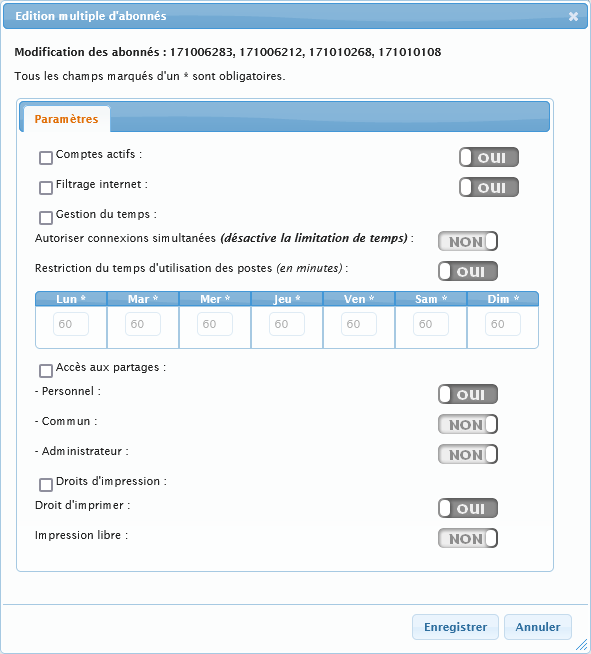
<span style="font-family: 'Century Gothic'; font-size: 10pt; color: #000000;">L'appui sur ce bouton </span><span style="font-family: 'Century Gothic'; font-size: 10pt; color: #000000;">déclenche l'ouverture de la fiche de l'abonné en cas de sélection d'un seul abonné. Dans le cas d'une sélection multiple, la boite de dialogue suivante permet de modifier en lot les paramètres de l'EPN de façon identique pour tous les abonnés sélectionnés.</span>

<span style="font-family: 'Century Gothic'; font-size: 10pt; color: #000000;">![embedded-image-dqe7hyl1.png](https://bookstack.decalog.net/uploads/images/gallery/2026-09/embedded-image-dqe7hyl1.png)</span>

<p class="callout success"><span style="font-family: 'Century Gothic'; font-size: 10pt; color: #000000;">Cas d’usage typique de l’édition multiple d’abonnés :  
Vous modifiez un paramètre par défaut des abonnés, par exemple vous passez de 60 à 120 minutes le mercredi. Comme ce paramètre par défaut n’est pas rétroactif pour les abonnés déjà présent</span><span style="font-family: 'Century Gothic'; font-size: 10pt; color: #000000;">s en base, il faut procéder à un traitement par lot sur la « Gestion du temps ». Le paramètre par défaut sera déjà présent. Il vous faudra refaire l’opération autant de fois que vous avez de pages dans votre liste d’abonnés (conseil : listez-les par 1000).</span></p>

<p class="callout warning"><span style="font-family: 'Century Gothic'; font-size: 10pt; color: #000000;">Attention, plus le nombre d’abonnés sélectionnés est important, plus l’opération de mise à jour sera longue.</span></p>

<a name="OLE_LINK2"></a><span style="font-family: 'Century Gothic'; font-size: 10pt; color: #000000;">![embedded-image-9mbj1a4b.png](https://bookstack.decalog.net/uploads/images/gallery/2026-09/embedded-image-9mbj1a4b.png)</span><span style="font-family: 'Century Gothic'; font-size: 10pt; color: #000000;"> </span><span style="font-family: 'Century Gothic'; font-size: 10pt; color: #000000;">**Supprimer l'abonné ou les abonnés sélectionnés**</span>

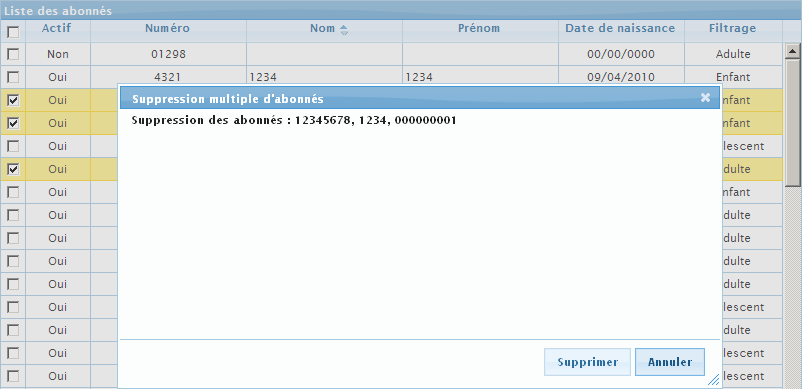
<span style="font-family: 'Century Gothic'; font-size: 10pt; color: #000000;">L'appui sur ce bouton ouvre la fiche de l'abonné (cas de la sélection d'un seul abonné), ou affiche la boite de dialogue suivante (plusieurs abonnés sélectionnés</span><span style="font-family: 'Century Gothic'; font-size: 10pt; color: #000000;">):</span>

<span style="font-family: 'Century Gothic'; font-size: 10pt; color: #000000;">![embedded-image-xasyyihy.png](https://bookstack.decalog.net/uploads/images/gallery/2026-09/embedded-image-xasyyihy.png)</span>

<p class="callout info"><span style="font-family: 'Century Gothic'; font-size: 10pt; color: #000000;">Les abonnés ne sont pas supprimés complètement. Vous les retrouverez pendant 1 an dans la liste des abonnés supprimés. Au-delà, les données sont anonymisées et les abonnés supprimés.</span></p>

<span style="font-family: 'Century Gothic'; font-size: 10pt; color: #000000;">**![embedded-image-fete7yt6.png](https://bookstack.decalog.net/uploads/images/gallery/2026-09/embedded-image-fete7yt6.png)**</span><span style="font-family: 'Century Gothic'; font-size: 10pt; color: #000000;"> **Importer un abonné**</span>

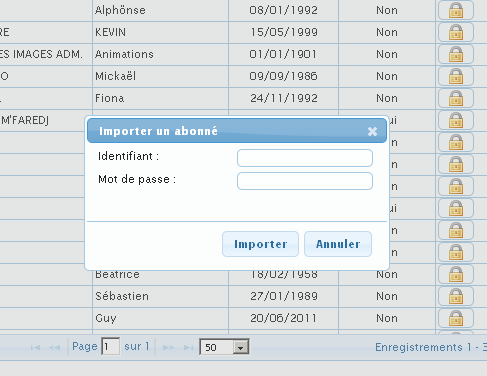
<span style="font-family: 'Century Gothic'; font-size: 10pt; color: #000000;">Si l’EPN est relié à une base externe (</span><span style="font-family: 'Century Gothic'; font-size: 10pt; color: #000000;">Decalog SIGB par exemple</span><span style="font-family: 'Century Gothic'; font-size: 10pt; color: #000000;">…), vous pouvez ajouter directement un abonné sans attendre qu’il se connecte une première fois sur un poste. </span>

<span style="font-family: 'Century Gothic'; font-size: 10pt; color: #000000;">**![embedded-image-4ry5vzjc.png](https://bookstack.decalog.net/uploads/images/gallery/2026-09/embedded-image-4ry5vzjc.png)**</span>

<p class="callout success"><span style="font-family: 'Century Gothic'; font-size: 10pt; color: #000000;">Pourquoi ce bouton ?  
</span><span style="font-family: 'Century Gothic'; font-size: 10pt; color: #000000;">Concrètement,</span><span style="font-family: 'Century Gothic'; font-size: 10pt; color: #000000;"> cette opération ne sert à rien</span><span style="font-family: 'Century Gothic'; font-size: 10pt; color: #000000;">,</span><span style="font-family: 'Century Gothic'; font-size: 10pt; color: #000000;"> car Decalog EPN importe l’abonné dans la base de données automatiquement lors de sa première connexion.  
Mais cela peut servir dans </span><span style="font-family: 'Century Gothic'; font-size: 10pt; color: #000000;">deux</span><span style="font-family: 'Century Gothic'; font-size: 10pt; color: #000000;"> cas spécifique</span><span style="font-family: 'Century Gothic'; font-size: 10pt; color: #000000;">s</span><span style="font-family: 'Century Gothic'; font-size: 10pt; color: #000000;"> :   
1/ l’importation</span><span style="font-family: 'Century Gothic'; font-size: 10pt; color: #000000;"> peut permettre par exemple d’octroyer des crédits d’impression à un abonné enregistré sur la base externe mais pas encore enregistré sur l’EPN, sans avoir à demander à cet abonné de se connecter au préalable une première fois sur un poste.  
2/ elle peut également permettre d’importer l’abonné pour lui créer une réservation de poste.</span></p>

#### <span style="font-family: 'Century Gothic'; font-size: 12pt; color: #404040;">Paramétrer individuellement les abonnés</span>

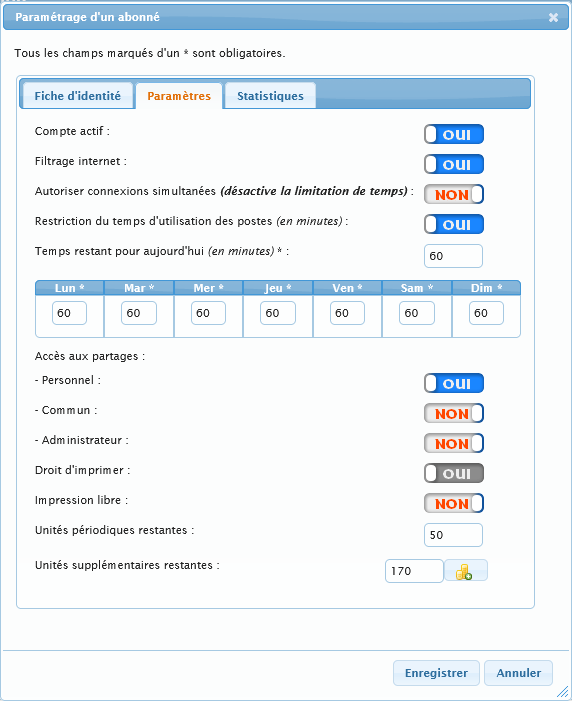
<span style="font-family: 'Century Gothic'; font-size: 10pt; color: #000000;">En double-cliquant sur un abonné, on entre en édition sur </span><span style="font-family: 'Century Gothic'; font-size: 10pt; color: #000000;">la fiche de </span><span style="font-family: 'Century Gothic'; font-size: 10pt; color: #000000;">celui-ci (le comportement est le même que si on le sélectionne et qu’on clique ensuite sur le bouton </span><span style="font-family: 'Century Gothic'; font-size: 10pt; color: #000000;">![embedded-image-fhbmuly6.png](https://bookstack.decalog.net/uploads/images/gallery/2026-09/embedded-image-fhbmuly6.png)</span><span style="font-family: 'Century Gothic'; font-size: 10pt; color: #000000;">.</span><span style="font-family: 'Century Gothic'; font-size: 10pt; color: #000000;"> A partir de cette fiche on va pouvoir spécifier de manière individuelle comment fonctionne Decalog EPN.</span>

<span style="font-family: 'Century Gothic'; font-size: 10pt; color: #000000;">Par exemple, on va pouvoir définir qu’un abonné, contrairement à tous les autres, bénéficie de 120 minutes le mercredi au lieu de 60. Ou encore que tel abonné </span><span style="font-family: 'Century Gothic'; font-size: 10pt; color: #000000;">a</span><span style="font-family: 'Century Gothic'; font-size: 10pt; color: #000000;"> accès à l’espace commun et pas un autre.</span>

<span style="font-family: 'Century Gothic'; font-size: 10pt; color: #000000;">![embedded-image-avp8wado.png](https://bookstack.decalog.net/uploads/images/gallery/2026-09/embedded-image-avp8wado.png)</span>

<span style="font-family: 'Century Gothic'; font-size: 10pt; color: #000000;">Cette fiche va permettre en outre de </span><span style="font-family: 'Century Gothic'; font-size: 10pt; color: #000000;">**redonner du temps à un abonné**</span><span style="font-family: 'Century Gothic'; font-size: 10pt; color: #000000;"> si jamais il a utilisé tout son temps pour la journée et qu’il est déconnecté d’un poste ou d’une tablette.</span><span style="font-family: 'Century Gothic'; font-size: 10pt; color: #000000;"> Il faut pour cela éditer le champ « Temps restant pour aujourd’hui ». </span>

<span style="font-family: 'Century Gothic'; font-size: 10pt; color: #000000;">Attention la modification de ce champ n’est prise en compte qu</span><span style="font-family: 'Century Gothic'; font-size: 10pt; color: #000000;">e si l’abonné s’est connecté au moins une fois dans la journée et qu’il n’est plus actuellement connecté. Si vous cherchez à rajouter du temps à un abonné actuellement connecté, rendez-vous sur la liste des postes ou sur la liste des équipements connectés </span><span style="font-family: 'Century Gothic'; font-size: 10pt; color: #000000;">WIFI.</span>

#### <span style="font-family: 'Century Gothic'; font-size: 12pt; color: #404040;">Micro-statistiques personnelles</span>

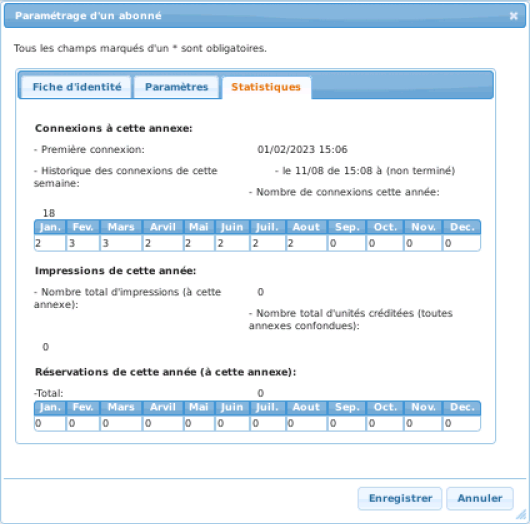
<span style="font-family: 'Century Gothic'; font-size: 10pt; color: #000000;">Ces micro-statistiques vont vous permettre de savoir de manière spécifique l’activité d</span><span style="font-family: 'Century Gothic'; font-size: 10pt; color: #000000;">’un</span><span style="font-family: 'Century Gothic'; font-size: 10pt; color: #000000;"> abonné.</span><span style="font-family: 'Century Gothic'; font-size: 10pt; color: #000000;"> </span>

<span style="font-family: 'Century Gothic'; font-size: 10pt; color: #000000;">![embedded-image-77vrjtal.png](https://bookstack.decalog.net/uploads/images/gallery/2026-09/embedded-image-77vrjtal.png)</span>

<span style="font-family: 'Century Gothic'; font-size: 10pt; color: #000000;">Elles sont particulièrement utiles si vous voulez savoir quand</span><span style="font-family: 'Century Gothic'; font-size: 10pt; color: #000000;"> un abonné est venu la dernière fois ou si vous détectez une anomalie d’usage (par exemple l’usager éteint le poste sauvagement et du coup on ne connait pas son heure de déconnexion). Cela vous permettra d’ajuster les paramètres des abonnés au cas par cas.</span>

### <a name="_Toc1476376"></a><a name="_Toc225499546"></a><span style="font-family: 'Century Gothic'; font-size: 13pt; color: #000000;">**Rechargement d’unités**</span>

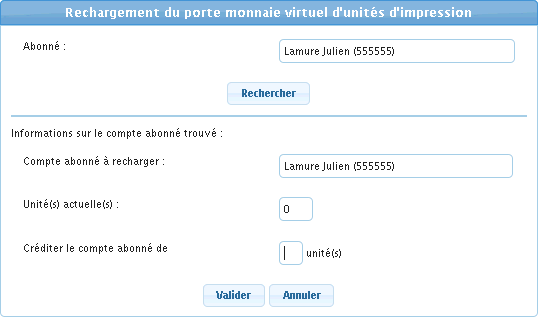
<span style="font-family: 'Century Gothic'; font-size: 10pt; color: #000000;">Cette page permet de rajouter des unités d’impression aux abonnés, si vous gérez les impressions payantes (ou contrôlées).</span>

<span style="font-family: 'Century Gothic'; font-size: 10pt; color: #000000;">![embedded-image-lmnq2asv.png](https://bookstack.decalog.net/uploads/images/gallery/2026-09/embedded-image-lmnq2asv.png)</span>

<span style="font-family: 'Century Gothic'; font-size: 10pt; color: #000000;">Il suffit</span><span style="font-family: 'Century Gothic'; font-size: 10pt; color: #000000;"> de renseigner le nom de l’abonné et le formulaire propose l’autocomplétion. Pour créditer l’abonné, ajouter des unités puis valider.</span>

### <a name="_Toc1476377"></a><a name="_Toc225499547"></a><span style="font-family: 'Century Gothic'; font-size: 13pt; color: #000000;">**Abonnés supprimés**</span>

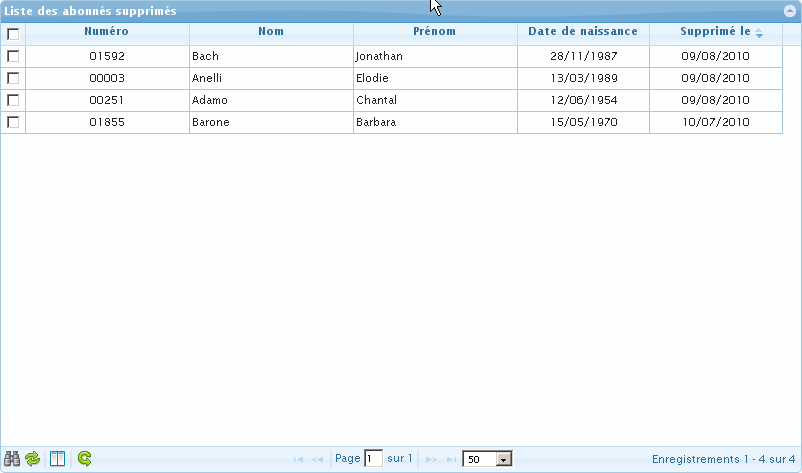
<span style="font-family: 'Century Gothic'; font-size: 10pt; color: #000000;">![embedded-image-ouxcu94f.png](https://bookstack.decalog.net/uploads/images/gallery/2026-09/embedded-image-ouxcu94f.png)</span>

<span style="font-family: Arial; font-size: 10pt; color: #000000;">Lorsque vous avez utilisé la fonction "suppression des abonnés", vous pouvez en voir la liste et agir sur celle-ci à travers les boutons suivants :</span>

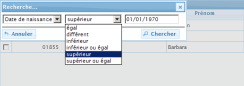
<span style="font-family: 'Century Gothic'; font-size: 10pt; color: #000000;">![embedded-image-faixaomh.png](https://bookstack.decalog.net/uploads/images/gallery/2026-09/embedded-image-faixaomh.png)</span><span style="font-family: 'Century Gothic'; font-size: 10pt; color: #000000;"> </span><span style="font-family: 'Century Gothic'; font-size: 10pt; color: #000000;">Rechercher :</span>

<span style="font-family: 'Century Gothic'; font-size: 10pt; color: #000000;">![embedded-image-wqdyld8g.png](https://bookstack.decalog.net/uploads/images/gallery/2026-09/embedded-image-wqdyld8g.png)</span>

<span style="font-family: 'Century Gothic'; font-size: 10pt; color: #000000;">![embedded-image-q2mk3fjl.png](https://bookstack.decalog.net/uploads/images/gallery/2026-09/embedded-image-q2mk3fjl.png)</span><span style="font-family: 'Century Gothic'; font-size: 10pt; color: #000000;"> Recharger le tableau (pour rafraîchir l'affichage de la liste après modification.)</span>

<span style="font-family: 'Century Gothic'; font-size: 10pt; color: #000000;">D</span><span style="font-family: 'Century Gothic'; font-size: 10pt; color: #000000;">ans un premier temps, les abonnés supprimés ne le sont que de la liste des abonnés. </span><span style="font-family: 'Century Gothic'; font-size: 10pt; color: #000000;">**Ils sont gardés en mémoire dans la liste des abonnés supprimés pendant 1 an avant d'être définitivement et automatiquement supprimés de l'EPN**</span><span style="font-family: 'Century Gothic'; font-size: 10pt; color: #000000;"> </span><span style="font-family: 'Century Gothic'; font-size: 10pt; color: #000000;">(</span><span style="font-family: 'Century Gothic'; font-size: 10pt; color: #000000;">et donc de la liste des abonnés supprimés).</span><span style="font-family: 'Century Gothic'; font-size: 10pt; color: #000000;"> Pendant 1 an par conséquent, les abonnés peuvent revenir chercher leurs unités d’impression et leurs documents dans leur espace personnel.</span>

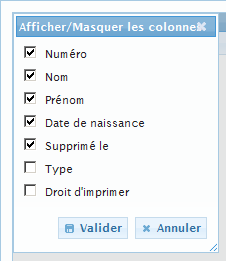
<span style="font-family: 'Century Gothic'; font-size: 10pt; color: #000000;">![embedded-image-yzmfq6ar.png](https://bookstack.decalog.net/uploads/images/gallery/2026-09/embedded-image-yzmfq6ar.png)</span><span style="font-family: 'Century Gothic'; font-size: 10pt; color: #000000;"> Afficher / Masquer les colonnes :</span>

<span style="font-family: 'Century Gothic'; font-size: 10pt; color: #000000;">![embedded-image-ysvcp2l7.png](https://bookstack.decalog.net/uploads/images/gallery/2026-09/embedded-image-ysvcp2l7.png)</span>

<span style="font-family: 'Century Gothic'; font-size: 10pt; color: #000000;">Cocher ou décocher les cases pour afficher ou cacher les colonnes.</span>

<span style="font-family: 'Century Gothic'; font-size: 10pt; color: #000000;">N'oubliez pas de </span><span style="font-family: 'Century Gothic'; font-size: 10pt; color: #000000;">![embedded-image-ursodcxl.png](https://bookstack.decalog.net/uploads/images/gallery/2026-09/embedded-image-ursodcxl.png)</span><span style="font-family: 'Century Gothic'; font-size: 10pt; color: #000000;"> après avoir effectué votre choix.</span>

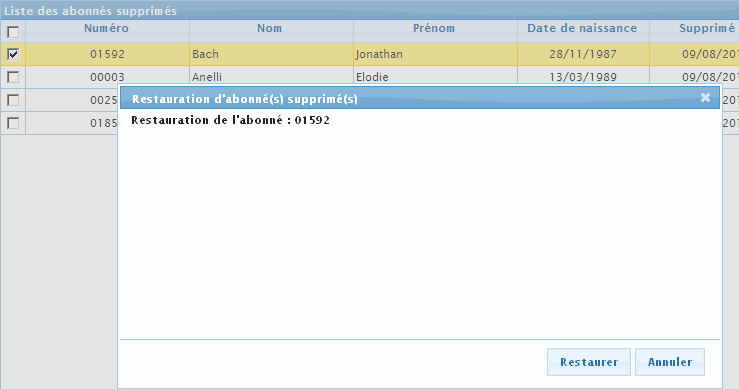
<span style="font-family: 'Century Gothic'; font-size: 10pt; color: #000000;">![embedded-image-kbybfzfd.png](https://bookstack.decalog.net/uploads/images/gallery/2026-09/embedded-image-kbybfzfd.png)</span><span style="font-family: 'Century Gothic'; font-size: 10pt; color: #000000;"> Restaurer l'abonné ou les abonnés sélectionnés (cases cochées.)</span>

<span style="font-family: 'Century Gothic'; font-size: 10pt; color: #000000;">![embedded-image-gwteu3q9.png](https://bookstack.decalog.net/uploads/images/gallery/2026-09/embedded-image-gwteu3q9.png)</span>

<span style="font-family: 'Century Gothic'; font-size: 10pt; color: #000000;">Cliquez sur </span><span style="font-family: 'Century Gothic'; font-size: 10pt; color: #000000;">![embedded-image-vowpjv3a.png](https://bookstack.decalog.net/uploads/images/gallery/2026-09/embedded-image-vowpjv3a.png)</span><span style="font-family: 'Century Gothic'; font-size: 10pt; color: #000000;"> pour récupérer les données de l'abonné (ou des abonnés) sélectionné et le placer de nouveau dans la liste des abonnés actifs. Sinon cliquez sur </span><span style="font-family: 'Century Gothic'; font-size: 10pt; color: #000000;">![embedded-image-vphyfh31.png](https://bookstack.decalog.net/uploads/images/gallery/2026-09/embedded-image-vphyfh31.png)</span><span style="font-family: 'Century Gothic'; font-size: 10pt; color: #000000;"> pour ne pas effectuer cette restauration.</span>