# Rubrique Site

<span style="font-family: 'Century Gothic'; font-size: 10pt; color: #000000;">Cette rubrique regroupe</span><span style="font-family: 'Century Gothic'; font-size: 10pt; color: #000000;"> les paramètres </span><span style="font-family: 'Century Gothic'; font-size: 10pt; color: #000000;">d’identification de votre site/établissement.</span>

### <a name="_Toc225499537"></a><span style="font-family: 'Century Gothic'; font-size: 13pt; color: #000000;">**Informations générales**</span>

<span style="font-family: 'Century Gothic'; font-size: 13pt; color: #000000;"><span style="font-family: 'Century Gothic'; font-size: 10pt; color: #000000;">Cette page vou</span><span style="font-family: 'Century Gothic'; font-size: 10pt; color: #000000;">s permet d’indiquer le nom de l’établissement, l’adresse de son site web, ainsi que le nom d’un responsable et un numéro de téléphone. Aucun de ces champs n’est obligatoire (à l’exception du nom de la bibliothèque) car ils sont à titre purement indicatif. </span></span>

<span style="font-family: 'Century Gothic'; font-size: 10pt; color: #767171;">![embedded-image-addglorz.png](https://bookstack.decalog.net/uploads/images/gallery/2026-09/embedded-image-addglorz.png)</span>

<span style="font-family: 'Century Gothic'; font-size: 9pt; color: #767171;">*Informations générales*</span>

<span style="font-family: 'Century Gothic'; font-size: 10pt; color: #000000;">Vous pouvez également activer les sessions anonymes pour vos abonnés ainsi que la réservation de postes (si vous optez pour ce module).</span>

<p class="callout info"><span style="font-family: 'Century Gothic'; font-size: 10pt; color: #000000;">Le logo s’affichera sur la mire d’authentification des postes ainsi que sur les pages de connexion au portail captif et d’auto-inscription.</span></p>

<p class="callout warning"><span style="font-family: 'Century Gothic'; font-size: 10pt; color: #000000;">Activer les sessions anonymes signifie que vous pourrez permettre à vos abonnés d’accéder, sur les postes de votre choix, à une session dédiée à la </span><span style="font-family: 'Century Gothic'; font-size: 10pt; color: #000000;">**recherche documentaire**</span><span style="font-family: 'Century Gothic'; font-size: 10pt; color: #000000;"> (accès au catalogue) sans avoir à rentrer d’identifiant</span><span style="font-family: 'Century Gothic'; font-size: 10pt; color: #000000;">, à la manière d’un poste OPAC.</span></p>

<p class="callout warning"><span style="font-family: 'Century Gothic'; font-size: 10pt; color: #000000;">En fonction du client installé sur vos postes, la session anonyme peut se transformer en </span><span style="font-family: 'Century Gothic'; font-size: 10pt; color: #000000;">**session d’auto-inscription**</span><span style="font-family: 'Century Gothic'; font-size: 10pt; color: #000000;"> des abonnés. Ceci peut être utile si jamais </span><span style="font-family: 'Century Gothic'; font-size: 10pt; color: #000000;">il faut </span><span style="font-family: 'Century Gothic'; font-size: 10pt; color: #000000;">par exemple donner un accès temporaire à des gens de passage. Demandez des informations au support : </span>[<span style="font-family: Gotham; font-size: 10pt; color: #406eff;">https://support.decalog.net</span>](https://support.decalog.net/ "https://support.decalog.net")</p>

<span style="font-family: 'Century Gothic'; font-size: 10pt; color: #000000;">Dans cette page vous pouvez également, si l’option de réservation de postes est optée, désactiver de votre côté les réservations sur les postes publics. Cela </span><span style="font-family: 'Century Gothic'; font-size: 10pt; color: #000000;">peut être</span><span style="font-family: 'Century Gothic'; font-size: 10pt; color: #000000;"> utile si jamais votre établissement fait partie d’un réseau et que vous ne voulez pas apparaître dans la liste des </span><span style="font-family: 'Century Gothic'; font-size: 10pt; color: #000000;">établissements où la réservation est activée.</span>

### <a name="_Toc225499538"></a><span style="font-family: 'Century Gothic'; font-size: 13pt; color: #000000;">**Calendrier**</span>

<a name="_Hlk79403364"></a><span style="font-family: 'Century Gothic'; font-size: 10pt; color: #000000;">La page Calendrier permet de définir</span><span style="font-family: 'Century Gothic'; font-size: 10pt; color: #000000;"> les horaires d’ouverture des postes informatiques au public, de paramétrer le démarrage et l’arrêt automatique des postes ainsi que les périodes de fermeture (redéfinies chaque année) et les jours fériés (reportés automatiquement d’une année sur l’autre).</span>

#### <span style="font-family: 'Century Gothic'; font-size: 12pt; color: #404040;">Horaires d’ouverture</span>

<span style="font-family: 'Century Gothic'; font-size: 10pt; color: #000000;">![embedded-image-ocnpwkqs.png](https://bookstack.decalog.net/uploads/images/gallery/2026-09/embedded-image-ocnpwkqs.png)</span>

<span style="font-family: 'Century Gothic'; font-size: 10pt; color: #000000;">L’onglet Horaires d’ouverture permet de définir les horaires d’allumage des postes de travail à destination du public. Vous pourrez distinguer l’allumage sur différentes localisations/espaces dans la rubrique Localisations des équipements.</span>

<p class="callout info"><span style="font-family: 'Century Gothic'; font-size: 10pt; color: #000000;">Veillez à ce que ces horaires d’ouverture soient les plus amples possibles</span><span style="font-family: 'Century Gothic'; font-size: 10pt; color: #000000;"> : les horaires sur les localisations ne sont que des restrictions sur les horaires d’ouverture. Il en va de même si vous souhaitez réserver des postes sur des créneaux pendant lesquels l’établissement est normalement fermé au public (ateliers par exemple)</span></p>

#### <a name="_Toc1476364"></a><span style="font-family: 'Century Gothic'; font-size: 12pt; color: #404040;">Démarrage et arrêt automatique des postes</span>

<span style="font-family: 'Century Gothic'; font-size: 10pt; color: #000000;">L’onglet Démarrage et arrêt automatique des postes permet de paramétrer comme son nom l’indique le démarrage (si les postes le permettent, voir point info ci-dessous) et l’arrêt automatique des postes multimédias aux </span><span style="font-family: 'Century Gothic'; font-size: 10pt; color: #000000;">horaires spécifiés dans l’onglet « Horaires d’ouverture » et des jours de fermeture spécifiés dans les onglets périodes de fermeture et les jours fériés. Si vous souhaitez paramétrer des horaires spécifiques à des localisations, vous référer au paragraphe Localisations et paramètres associés</span>**<span style="font-family: 'Century Gothic'; font-size: 10pt; color: #000000;">.</span>**

<p class="callout warning"><span style="font-family: 'Century Gothic'; font-size: 10pt; color: #000000;">Le démarrage à distance des postes EPN reposant sur le principe de </span><span style="font-family: 'Century Gothic'; font-size: 10pt; color: #000000;">WakeOnLAN</span><span style="font-family: 'Century Gothic'; font-size: 10pt; color: #000000;"> (envoi de « paquet magique » via le réseau), il nécessite que les postes clients EPN supportent cette</span><span style="font-family: 'Century Gothic'; font-size: 10pt; color: #000000;"> </span><span style="font-family: 'Century Gothic'; font-size: 10pt; color: #000000;">fonctionnalité et qu'el</span><span style="font-family: 'Century Gothic'; font-size: 10pt; color: #000000;">le soit activée au niveau du BIOS de chaque ordinateur, ainsi que dans les paramètres de la carte réseau dans Windows. Ce paramétrage variant d'un modèle de poste à l'autre, se reporter à la documentation des ordinateurs pour savoir comment les configurer.</span></p>

#### <span style="font-family: 'Century Gothic'; font-size: 12pt; color: #404040;">Périodes de fermeture</span>

<span style="font-family: 'Century Gothic'; font-size: 10pt; color: #000000;">Cette page permettra, si l’option d’allumage automatique est activée, que les poste ne démarrent pas pendant les jours planifiés. </span>

<span style="font-family: 'Century Gothic'; font-size: 10pt; color: #000000;">L’édition des périodes de fermeture et des jours fériés se fait à l’aide des boutons </span><span style="font-family: 'Century Gothic'; font-size: 10pt; color: #000000;">![embedded-image-deaki4ek.png](https://bookstack.decalog.net/uploads/images/gallery/2026-09/embedded-image-deaki4ek.png)</span><span style="font-family: 'Century Gothic'; font-size: 10pt; color: #000000;"> (créer), </span><span style="font-family: 'Century Gothic'; font-size: 10pt; color: #000000;">![embedded-image-fdnwpfzo.png](https://bookstack.decalog.net/uploads/images/gallery/2026-09/embedded-image-fdnwpfzo.png)</span><span style="font-family: 'Century Gothic'; font-size: 10pt; color: #000000;"> (modifier) et </span><span style="font-family: 'Century Gothic'; font-size: 10pt; color: #000000;">![embedded-image-8imyr3xa.png](https://bookstack.decalog.net/uploads/images/gallery/2026-09/embedded-image-8imyr3xa.png)</span><span style="font-family: 'Century Gothic'; font-size: 10pt; color: #000000;"> (supprimer). Vous pouvez définir comme période de fermeture un jour, une période (de tel jour à tel jour) ou une période avec horaires de début et de fin spécifiés. </span>

<p class="callout info"><span style="font-family: 'Century Gothic'; font-size: 10pt; color: #000000;">Dans cet onglet, vous pouvez paramétrer les jours fériés variables dans l’année : lundi de Pâques, jeudi de l’</span><span style="font-family: 'Century Gothic'; font-size: 10pt; color: #000000;">A</span><span style="font-family: 'Century Gothic'; font-size: 10pt; color: #000000;">scension, vendredi saint…</span><span style="font-family: 'Century Gothic'; font-size: 10pt; color: #000000;"> ainsi que les dates de fermeture pour congés.</span></p>

#### <span style="font-family: 'Century Gothic'; font-size: 12pt; color: #404040;">Jours fériés</span>

<p class="callout info"><span style="font-family: 'Century Gothic'; font-size: 10pt; color: #000000;">Les jours fériés sont valables indéfiniment. </span><span style="font-family: 'Century Gothic'; font-size: 10pt; color: #000000;">Paramétrez les </span><span style="font-family: 'Century Gothic'; font-size: 10pt; color: #000000;">jours fériés invariables d’année en année sur cet onglet</span><span style="font-family: 'Century Gothic'; font-size: 10pt; color: #000000;">, par exemple le 01/01</span><span style="font-family: 'Century Gothic'; font-size: 10pt; color: #000000;">.</span></p>

### <a name="_Toc1476367"></a><a name="_Toc225499539"></a><span style="font-family: 'Century Gothic'; font-size: 13pt; color: #000000;">**Localisations des équipements**</span>

#### <a name="_Toc1476368"></a><span style="font-family: 'Century Gothic'; font-size: 12pt; color: #404040;">Critères de localisation</span>

<span style="font-family: 'Century Gothic'; font-size: 10pt; color: #000000;">Vous pouvez ici définir les différentes localisations possibles pour vos postes (cela vous permettra ensuite de pouvoir associer un poste à une localisation). Vous pouvez définir des bâtiments, des é</span><span style="font-family: 'Century Gothic'; font-size: 10pt; color: #000000;">tages et des espaces (aucun champ n’est obligatoire). Pour créer une nouvelle localisation, saisissez son nom dans le champ correspondant et cliquez sur le bouton +. Pour supprimer une localisation, sélectionnez-la dans la liste de droite et cliquez sur -.</span>

#### <span style="font-family: 'Century Gothic'; font-size: 12pt; color: #404040;">Localisations et paramètres associés</span>

<span style="font-family: 'Century Gothic'; font-size: 10pt; color: #000000;">Cette page permet de configurer différemment les postes selon leur localisation dans votre établissement.</span>

<span style="font-family: 'Century Gothic'; font-size: 10pt; color: #000000;">En ajoutant des localisations, vous pourrez modifier l’apparence des postes et spécifier des horaires différents de ceux que vous aurez définis dans les Horaires d'ouverture.</span>

<span style="font-family: 'Century Gothic'; font-size: 10pt; color: #000000;">En double-cliquant sur une localisation (ce qui équivaut à cliquer sur le bouton </span><span style="font-family: 'Century Gothic'; font-size: 10pt; color: #000000;">![embedded-image-wjssggle.png](https://bookstack.decalog.net/uploads/images/gallery/2026-09/embedded-image-wjssggle.png)</span><span style="font-family: 'Century Gothic'; font-size: 10pt; color: #000000;">), on va pouvoir spécifier par exemple quels fonds d’écran appliquer aux postes appartenant à cette localisation :</span>

<span style="font-family: 'Century Gothic'; font-size: 10pt; color: #000000;">**Fiche d’identité**</span>

<span style="font-family: 'Century Gothic'; font-size: 10pt; color: #000000;">Dans cet onglet vous allez pouvoir paramétrer la possibilité de personnaliser le poste ou les postes qui fera/feront partie de la localisation : le fait de cocher les options permet d’activer les onglets Personnalisation graphique et Horaires spécifique</span><span style="font-family: 'Century Gothic'; font-size: 10pt; color: #000000;">s</span><span style="font-family: 'Century Gothic'; font-size: 10pt; color: #000000;"> :</span>

<span style="font-family: 'Calibri Light'; font-size: 11pt; color: #000000;">![embedded-image-9eop4sad.png](https://bookstack.decalog.net/uploads/images/gallery/2026-09/embedded-image-9eop4sad.png)</span>

<span style="font-family: 'Calibri Light'; font-size: 11pt; color: #000000;">**Personnalisation graphique**</span>

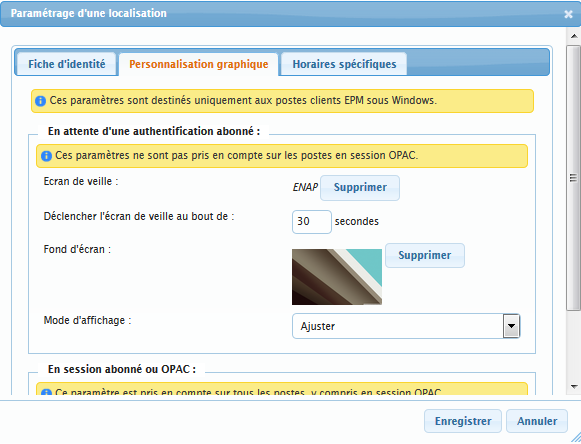
<span style="font-family: 'Calibri Light'; font-size: 11pt; color: #000000;">Dans cet onglet vous allez pouvoir paramétrer l’aspect graphique des postes faisant partie de la localisation paramétrée. Il vous est possible :</span>

- <span style="font-family: 'Calibri Light'; font-size: 11pt; color: #000000;">de</span><span style="font-family: 'Calibri Light'; font-size: 11pt; color: #000000;"> paramétrer un </span><span style="font-family: 'Calibri Light'; font-size: 11pt; color: #000000;">**écran de veille**</span><span style="font-family: 'Calibri Light'; font-size: 11pt; color: #000000;"> (ne fonctionne qu’avec des fichiers .</span><span style="font-family: 'Calibri Light'; font-size: 11pt; color: #000000;">scr</span><span style="font-family: 'Calibri Light'; font-size: 11pt; color: #000000;">)</span>
- <span style="font-family: 'Calibri Light'; font-size: 11pt; color: #000000;">de</span><span style="font-family: 'Calibri Light'; font-size: 11pt; color: #000000;"> paramétrer un </span><span style="font-family: 'Calibri Light'; font-size: 11pt; color: #000000;">**fond d’écran**</span><span style="font-family: 'Calibri Light'; font-size: 11pt; color: #000000;"> pour la fenêtre de connexion de l’abonné </span>
- <span style="font-family: 'Calibri Light'; font-size: 11pt; color: #000000;">de</span><span style="font-family: 'Calibri Light'; font-size: 11pt; color: #000000;"> paramétrer un </span><span style="font-family: 'Calibri Light'; font-size: 11pt; color: #000000;">**fond d’écran**</span><span style="font-family: 'Calibri Light'; font-size: 11pt; color: #000000;"> pendant la connexion de l’abonné</span>

<p class="callout success"><span style="font-family: 'Century Gothic'; font-size: 10pt; color: #000000;">Un bon usage de l’écran de veille est de promouvoir vos actualités (ateliers, lectures, concerts, etc.). Vous trouverez bon nombre de logiciels</span><span style="font-family: 'Century Gothic'; font-size: 10pt; color: #000000;">, payants pour la plupart, </span><span style="font-family: 'Century Gothic'; font-size: 10pt; color: #000000;">permettant de créer des écrans de veille sur Internet : </span><span style="font-family: 'Century Gothic'; font-size: 10pt; color: #000000;">Anylogo</span><span style="font-family: 'Century Gothic'; font-size: 10pt; color: #000000;"> par exemple.</span></p>

<span style="font-family: 'Calibri Light'; font-size: 11pt; color: #000000;">![embedded-image-5zrakupu.png](https://bookstack.decalog.net/uploads/images/gallery/2026-09/embedded-image-5zrakupu.png)</span>

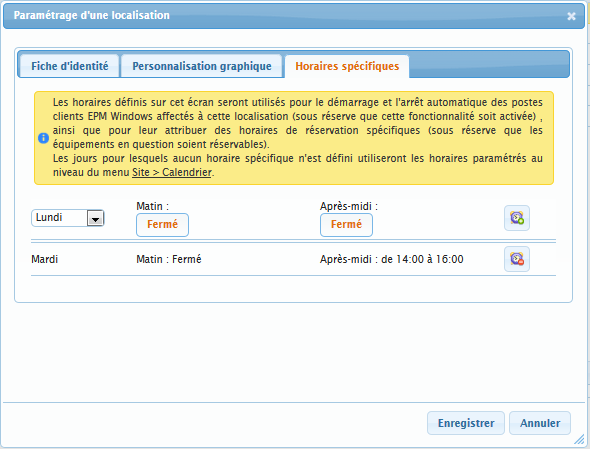
<span style="font-family: 'Calibri Light'; font-size: 11pt; color: #000000;">**Horaires spécifiques**</span>

<span style="font-family: 'Calibri Light'; font-size: 11pt; color: #000000;">Les horaires que vous spécifierez ici prendront le pas sur ceux paramétrés dans les Horaires d'ouverture</span><span style="font-family: 'Calibri Light'; font-size: 11pt; color: #000000;">.</span>

<p class="callout info"><span style="font-family: 'Calibri Light'; font-size: 11pt; color: #000000;">Les postes faisant partie de cette localisation pourront démarrer et s’éteindre à des heures/jours différents des autres.</span><span style="font-family: 'Calibri Light'; font-size: 11pt; color: #000000;"> Les horaires spécifiques doivent nécessairement être imbriqués dans les horaires d’ouverture, ils ne peuvent pas être en dehors des plages régulières.</span><a name="_Toc1476370"></a></p>

### <a name="_Toc225499540"></a><span style="font-family: 'Century Gothic'; font-size: 13pt; color: #000000;">**Charte d’utilisation**</span>

<span style="font-family: 'Calibri Light'; font-size: 11pt; color: #000000;">![embedded-image-jdbhnjel.png](https://bookstack.decalog.net/uploads/images/gallery/2026-09/embedded-image-jdbhnjel.png)</span>

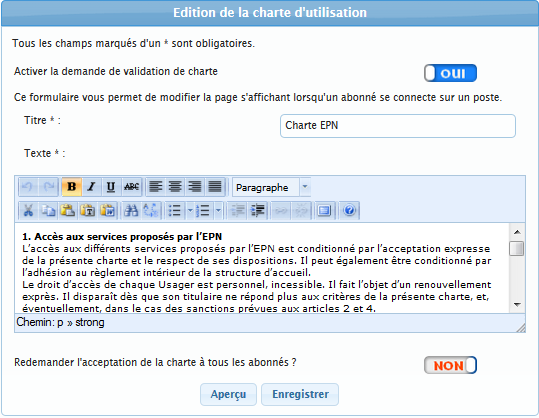
<span style="font-family: 'Calibri Light'; font-size: 11pt; color: #000000;">Sur cette page vous pouvez régler les pa</span><span style="font-family: 'Calibri Light'; font-size: 11pt; color: #000000;">ramètres concernant l’utilisation d’une charte. Vous pouvez choisir d’activer ou non la demande de charte. Si la demande de charte est activée, lorsqu’un abonné se connectera pour la première fois sur un poste, la charte s’affichera et il lui faudra alors </span><span style="font-family: 'Calibri Light'; font-size: 11pt; color: #000000;">l</span><span style="font-family: 'Calibri Light'; font-size: 11pt; color: #000000;">’accepter pour pouvoir se connecter (une fois validée, la charte ne sera plus affichée lors des connexions suivantes de l’abonné).</span>

<span style="font-family: 'Calibri Light'; font-size: 11pt; color: #000000;">Vous pouvez définir le titre et le texte de la charte. </span>

<span style="font-family: 'Calibri Light'; font-size: 11pt; color: #000000;">Le bouton « Redemander l’acceptation de la charte à tous les abonnés » sert</span><span style="font-family: 'Calibri Light'; font-size: 11pt; color: #000000;">, si par exemple vous avez modifié significativement votre charte, </span><span style="font-family: 'Calibri Light'; font-size: 11pt; color: #000000;">à </span><span style="font-family: 'Calibri Light'; font-size: 11pt; color: #000000;">redemander à tous les utilisateurs (même ceux ayant déjà accepté l</span><span style="font-family: 'Calibri Light'; font-size: 11pt; color: #000000;">a</span><span style="font-family: 'Calibri Light'; font-size: 11pt; color: #000000;"> charte) d’accepter la nouvelle version de la charte lors de leur prochaine connexion</span><span style="font-family: 'Calibri Light'; font-size: 11pt; color: #000000;">.</span>

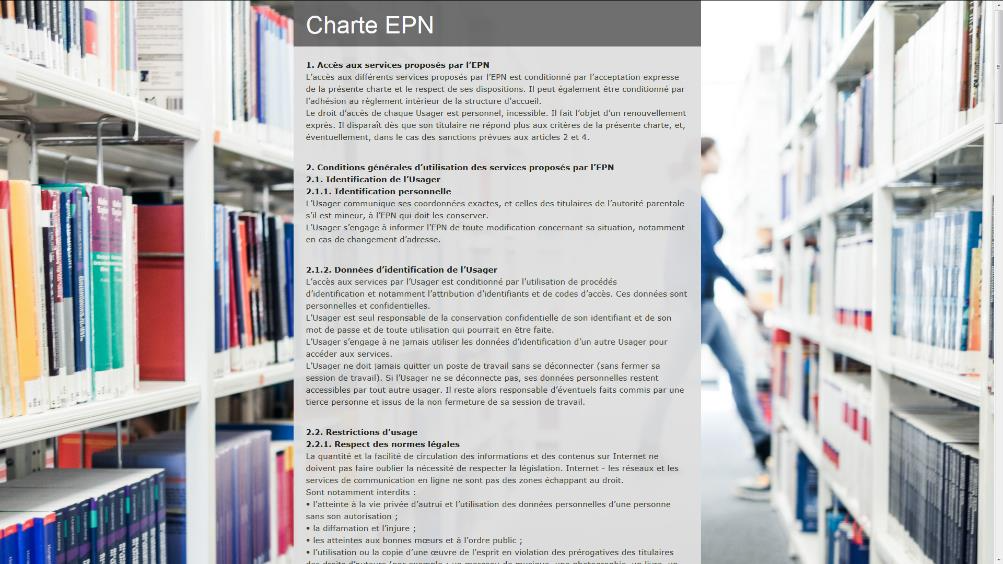
<span style="font-family: 'Calibri Light'; font-size: 11pt; color: #000000;"> </span><span style="font-family: 'Calibri Light'; font-size: 11pt; color: #000000;">Un bouton Aperçu vous permet de voir la charte telle qu’elle apparaîtra pour les abonnés :</span>

<span style="font-family: 'Century Gothic'; font-size: 10pt; color: #000000;">![embedded-image-rybhz4nn.png](https://bookstack.decalog.net/uploads/images/gallery/2026-09/embedded-image-rybhz4nn.png)</span>

<p class="callout info"><span style="font-family: 'Century Gothic'; font-size: 10pt; color: #000000;">Vous pouvez demander un exemple de charte au support</span></p>